



Workflow Automation Engine for ERPNext | Advanced Process Automation
Automate complex business processes without writing a single line of code. Connect multiple doctypes, integrate with external APIs, and schedule recurring actions with our visual, high-volume automation engine.
About This Custom App
The Workflow Automation Engine for ERPNext is an advanced automation solution designed to handle complex, cross-functional business processes beyond standard ERP workflows. Built on Frappe, it enables multi-step workflow automation, cross-doctype triggers, API integrations, and scheduled actions—all through a visual no-code builder. From finance and procurement to HR and operations, this engine automates repetitive tasks, reduces manual effort, and ensures seamless process execution. With real-time monitoring and audit logs, businesses gain full visibility, faster operations, and error-free automation across ERPNext.
Measurable Outcomes
Reduce manual operational work by up to 60% with workflow automation
Deploy 200+ ERPNext automation workflows across multiple industries
Accelerate finance month-end close from days to hours
Achieve ROI within 4 months through automation efficiency
Why businesses choose it
Enables advanced workflow automation beyond ERPNext native capabilities
Allows business teams to create workflows without developer dependency
Ensures real-time visibility with automated monitoring and alerts
Works across finance, HR, procurement, sales, and manufacturing modules
Key Features
Visual no-code workflow builder for ERPNext automation
Cross-doctype triggers and real-time field change automation
External API and webhook integration for seamless connectivity
Scheduled and recurring workflow automation execution
Multi-channel notifications via email, WhatsApp, and in-app alerts
Built-in retry logic and error handling for reliable automation
Complete execution audit logs for tracking and compliance
Where Workflow Engine Fits Best For Industry
Built for teams that need multi-step automation across doctypes, departments, and external systems without relying on custom code for every workflow.
manufacturing
Used in manufacturing for shift management, biometric attendance, contractor payroll, compliance, and workforce operations across plants.
services
Used by service organizations, healthcare teams, and other people-intensive operations for onboarding, leave, payroll, reimbursements, approvals, and employee self-service.
education
Used in schools, colleges, and institutions to manage staff records, attendance, leave, payroll, and policy-driven HR workflows.
trading
Used by trading companies for payroll, attendance, employee administration, statutory deductions, and approval-based HR operations.
retail
Used in retail for multi-location shift planning, attendance tracking, payroll, approvals, and store workforce management.
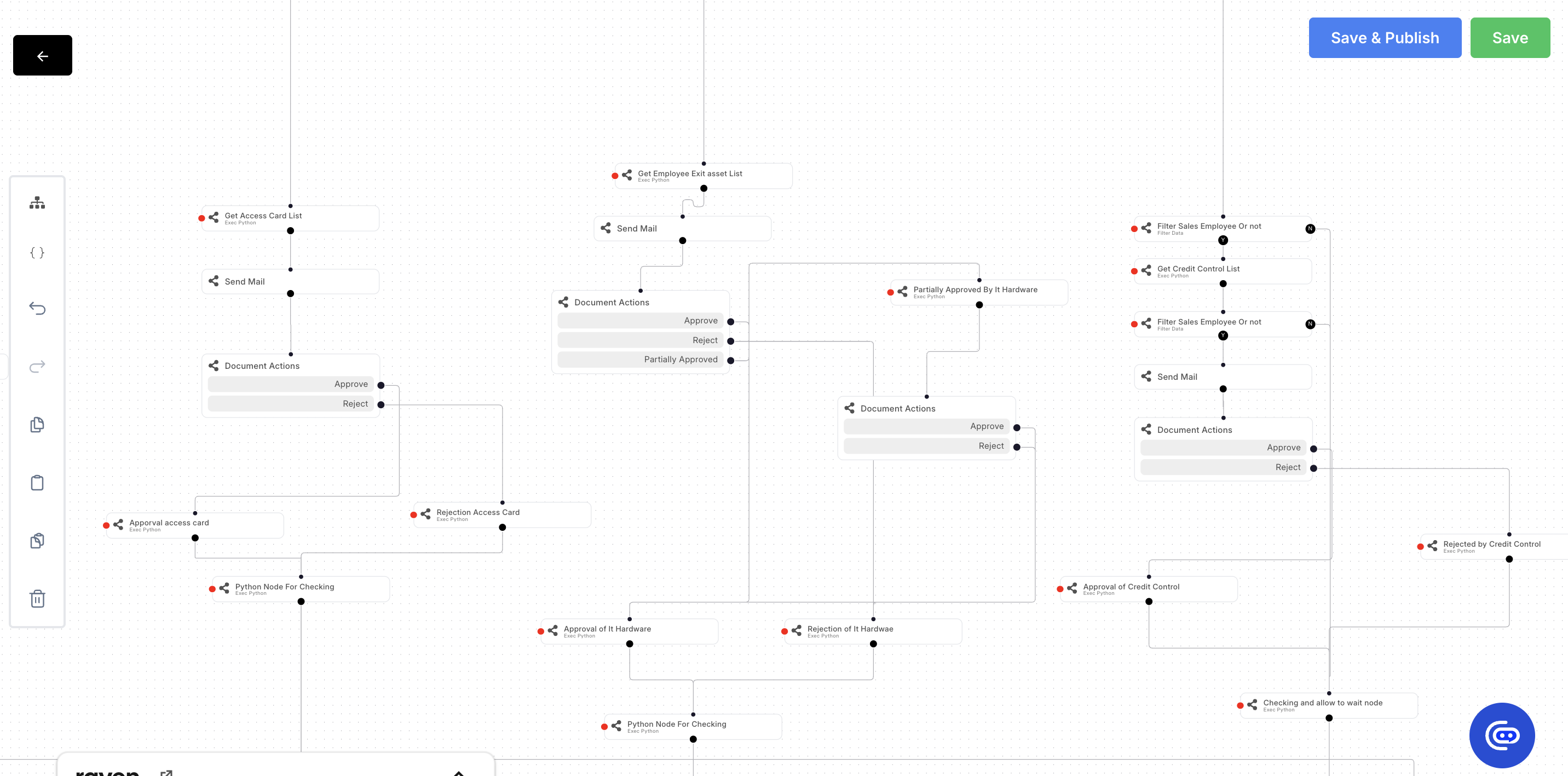
Visual Automation Builder & Execution Monitor
A drag-and-drop environment for designing automation logic and a real-time console for monitoring every workflow run.



Frequently Asked Questions
Common questions about no-code capabilities, cross-doctype logic, monitoring, and API integration.
Most automations can be built through the visual interface without writing code. Complex cases involving custom Python logic or proprietary API integration may require a one-time developer setup.
Yes — multi-step flows can read from and write to any ERPNext doctype in sequence. Cross-doctype logic is one of the engine's primary strengths.
Yes — a dedicated execution monitor shows every automation run, its steps, success/failure status, and full error logs. Failed automations trigger admin alerts.
Yes — REST API calls to external systems are supported as native automation action blocks. Authentication, headers, and payload are all configurable.
ERPNext native workflows handle document state transitions (Submit → Approved → Rejected). Our engine handles complex cross-doctype business process automation — they complement each other.
The engine is queue-based and handles concurrent automation runs. Load is managed by the underlying Frappe worker configuration, which scales with your server.
Move from manual steps to automated workflows
Stop wasting time on repetitive tasks across several doctypes. Build your first industrial-grade automation today with zero coding.
Looking for Brilliance?