



Frappe / Erpnext: V15 To V16 Migration Guide
Audience: Customers running Frappe/ERPNext v15 with custom apps, doctypes, and APIs Purpose: Decision guide + step-by-step migration process
1. Should You Migrate to v16?
Quick Decision Matrix
| Factor | Stay on v15 | Migrate to v16 |
|---|---|---|
| Stability preference | ✅ v15 is LTS | v16 is latest |
| Need new features | Not needed | ✅ Yes |
| Heavy customizations | More testing needed | Plan carefully |
| Frappe support lifecycle | Check EOL date | ✅ Actively maintained |
| Resources for testing | Limited | ✅ Available |
Key Things to Know Before Deciding
- Custom Doctypes — Generally safe across major versions; field definitions carry over. Minor schema changes may need review.
- Custom APIs / Server Scripts — Python APIs may change signatures between v15 and v16. All custom scripts must be tested.
- Custom Apps / Patches — Your custom app must have a dedicated
v16branch with any compatibility fixes before go-live. - Third-party integrations — Any app from the Frappe ecosystem (e.g., HRMS, Payments) must also have a v16-compatible release.
2. Migration Strategy Overview
Our approach uses a Replica-First, Patch-Then-Promote strategy — meaning we never touch production until everything is validated on a clone.
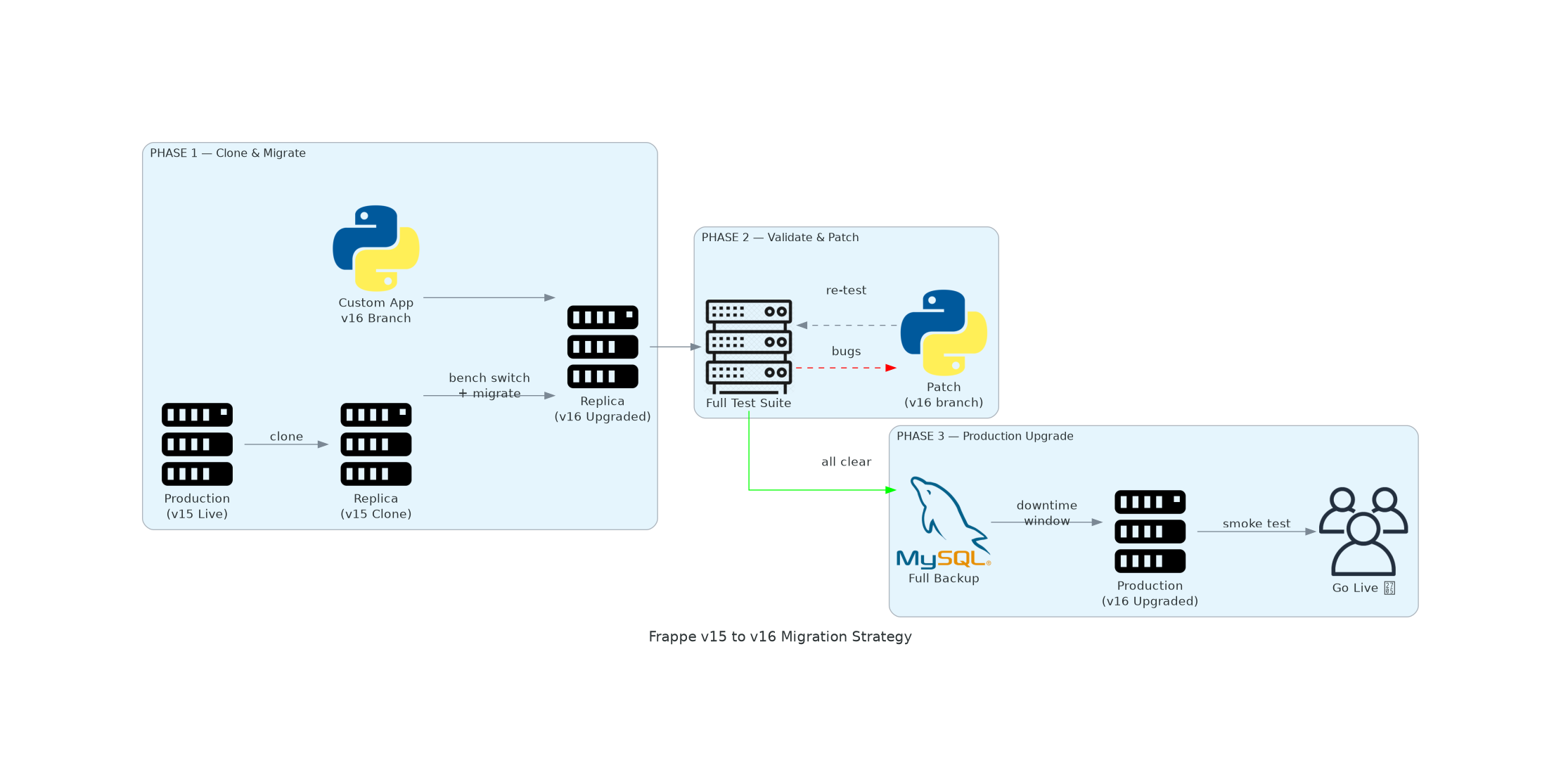
3 Phases:
- Phase 1: Clone production → migrate replica to v16
- Phase 2: Full test suite → write patches in version-16 branch of custom app
- Phase 3: Scheduled downtime → upgrade production → go live
3. Step-by-Step Process Flow
Phase 1 — Replica Setup & Migration
- Clone Production Instance — Copy DB + site files to new server/bench
- Upgrade Replica to v16
bench switch-to-branch version-16 frappe erpnext --upgrade bench update --patch bench --site yoursite.com migrate - Switch Custom App to v16 Branch
cd apps/your_custom_app && git checkout version-16 && cd ../../ - Run bench migrate again (applies custom patches for v16)
bench --site yoursite.com migrate
bench restart
Phase 2 — Validate & Patch on Replica
Run your full process flow and test everything. If bugs are found:
- Write a patch in the version-16 branch of your custom app
- Re-run migrations
- Re-test until clean
What to Test: - All custom Doctypes — CRUD operations - Custom APIs (whitelisted methods) - Server Scripts & Client Scripts - Custom Reports - Workflows & Notifications - Integrations (payment gateways, webhooks, etc.) - User Roles & Permissions - Print Formats
Phase 3 — Production Upgrade (Scheduled Downtime)
- Announce scheduled downtime to all users
- Take full backup
bench --site yoursite.com backup --with-files - Enable maintenance mode
bench --site yoursite.com set-maintenance-mode on - Upgrade core apps to v16
bench switch-to-branch version-16 frappe erpnext --upgrade - Run bench migrate (core Frappe/ERPNext migrations)
bench --site yoursite.com migrate - Switch custom app to version-16 branch
cd apps/your_custom_app && git pull && git checkout version-16 && cd ../../ - Run bench migrate again (applies custom app v16 patches)
bench --site yoursite.com migrate - Restart services
bench restart - Quick black-box smoke testing — login, check key modules
- Go live — disable maintenance mode
bench --site yoursite.com set-maintenance-mode off
4. Impact Assessment: Custom Doctypes & APIs
| Area | v15 → v16 Risk | Notes |
|---|---|---|
| Doctype structure | 🟢 Low | Schema changes are backward compatible |
| Custom fields | 🟢 Low | Preserved through migration |
| Link fields | 🟡 Medium | Verify target doctypes still exist |
| Client Scripts (JS) | 🟡 Medium | Frappe JS API may have changes |
| Server Scripts | 🟡 Medium | Python API signatures — must test |
| Whitelisted APIs | 🔴 High | Review all @frappe.whitelist() methods |
| Custom Print Formats | 🟡 Medium | Jinja changes possible |
Custom APIs — Key Areas to Review
Any Python function decorated with @frappe.whitelist() should be reviewed against v16 changelogs:
- frappe.get_doc() behaviors
- Permission model changes
- Background job APIs
- File handling APIs
5. Rollback Plan
If something goes wrong during production upgrade:
- Keep maintenance mode ON
- Restore DB from pre-upgrade backup:
bench --site yoursite.com --force restore /path/to/backup.sql.gz - Switch apps back to version-15:
bench switch-to-branch version-15 frappe erpnext your_custom_app bench --site yoursite.com migrate bench restart - Disable maintenance mode
6. Timeline Estimate
| Phase | Estimated Time |
|---|---|
| Replica setup & migration | 2–4 hours |
| Testing & patch writing | 3–10 days (depends on customization depth) |
| Production downtime window | 1–2 hours |
| Post-go-live monitoring | 1–2 weeks |
7. Summary Checklist
- Inventory all custom apps, doctypes, APIs
- Spin up replica from production clone
- Upgrade replica to v16 + run migrations
- Create
version-16branch in custom app repo - Test all process flows on replica
- Write and commit patches for any v16 bugs
- Schedule production downtime window
- Take full production backup
- Upgrade production + run migrations
- Switch custom app to v16 branch on production
- Run bench migrate (custom patches)
- Smoke test → Go live
- Monitor for 1–2 weeks
Prepared by Hybrowlabs Technologies | ERPNext Implementation Partner For queries: chinmay.kulkarni@hybrowlabs.tech