



Implementing Barcoding In Erpnext
A comprehensive guide to barcode-based stock tracking, traceability, and approval workflows across manufacturing and distribution operations.
Why Barcode?
| Current Problem | Impact | How Barcode Solves It |
|---|---|---|
| No formal process for stock transfers | Stock moves without documentation | Barcode scanning creates mandatory checkpoints with audit trail |
| Manual data entry in stock entries | Errors in item codes, quantities, batches | Auto-population eliminates manual entry errors |
| No visibility from production to dispatch | Difficult to trace stock location | End-to-end tracking from manufacturing to delivery |
| Discrepancies caught after the fact | Ledger already updated when mismatch found | Dual approval ensures verification before ledger update |
| Accountability gaps | Unclear who moved what and when | Clear trail of sender, receiver, timestamps for every movement |
The 3 Use Cases at a Glance
| Use Case | Barcode Applied To | Used In | Purpose |
|---|---|---|---|
| 1. Raw Material Inwarding | Purchase Order items | GRN (Goods Receipt Note) | Simplify and validate incoming material receipt |
| 2. Inter-Department Transfers | Pick List (1 per Box) | Stock Entry (Material Transfer) | Track internal stock movement with approval workflow |
| 3. Delivery Outwarding | Pick List (1 per Box) | Delivery Note / Challan | Validate and track outward dispatch to customers |
Key Concept: 1 Pick List = 1 Box/Carton (containing 10–12 bottles of finished goods). The Pick List barcode is the universal identifier used across Use Cases 2 and 3.
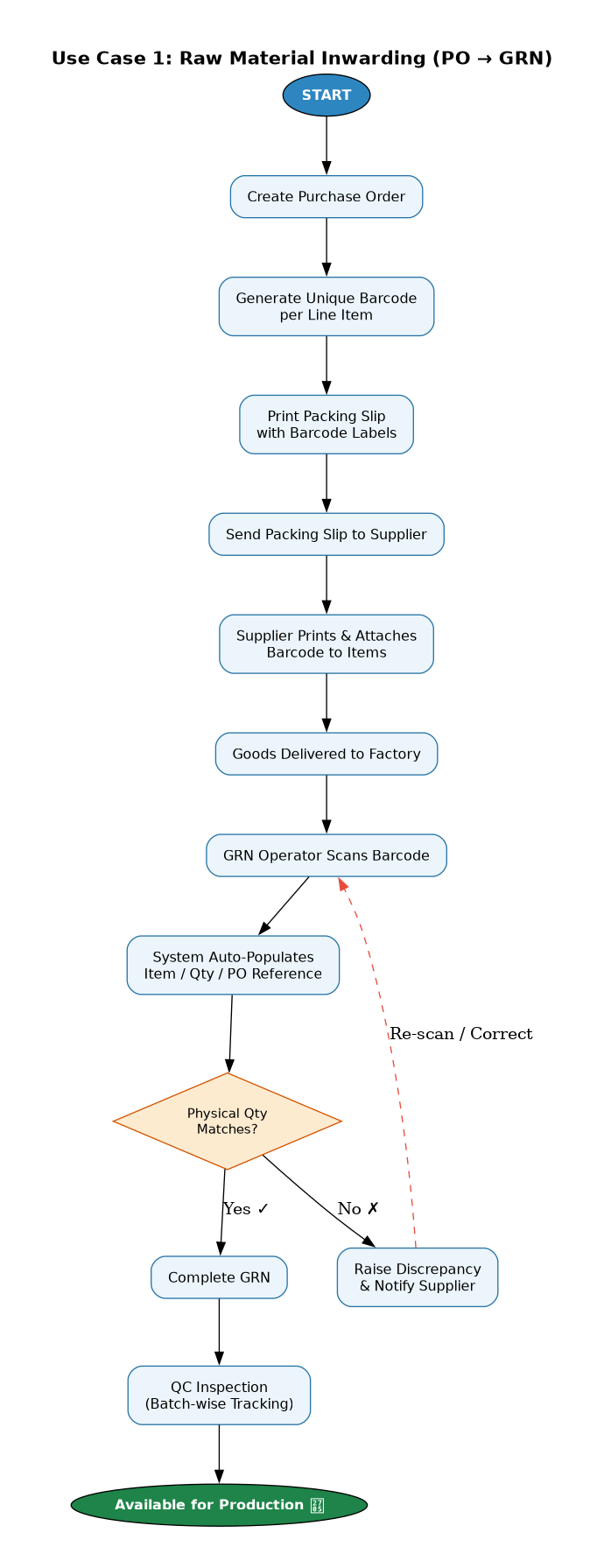
Use Case 1: Raw Material Inwarding (PO → GRN)
How It Works
- PO Creation — A Purchase Order is raised; the system generates a unique QR/barcode per line item
- Packing Slip — A printable packing slip with cut-out barcode labels is sent to the supplier
- Supplier Action — Supplier prints and attaches barcodes to the respective packages before delivery
- GRN Scanning — Warehouse operator scans the barcode at goods receipt
- Auto-Population — System identifies item, quantity, and PO reference automatically
- Verification — Operator confirms physical quantity and completes GRN
- QC Inspection — Materials proceed to Quality Check; barcode enables batch-wise QC tracking
Benefits
- Faster GRN processing — no manual item lookup
- Reduced data entry errors
- Automatic PO-to-GRN linkage
Supplier Compliance Requirement
Suppliers must be trained to: - Print packing slip/barcode labels received with PO - Cut and attach labels on respective packages - Ensure barcodes are visible and undamaged during transit
Use Case 2: Inter-Department Transfers (Pick List → Stock Entry)
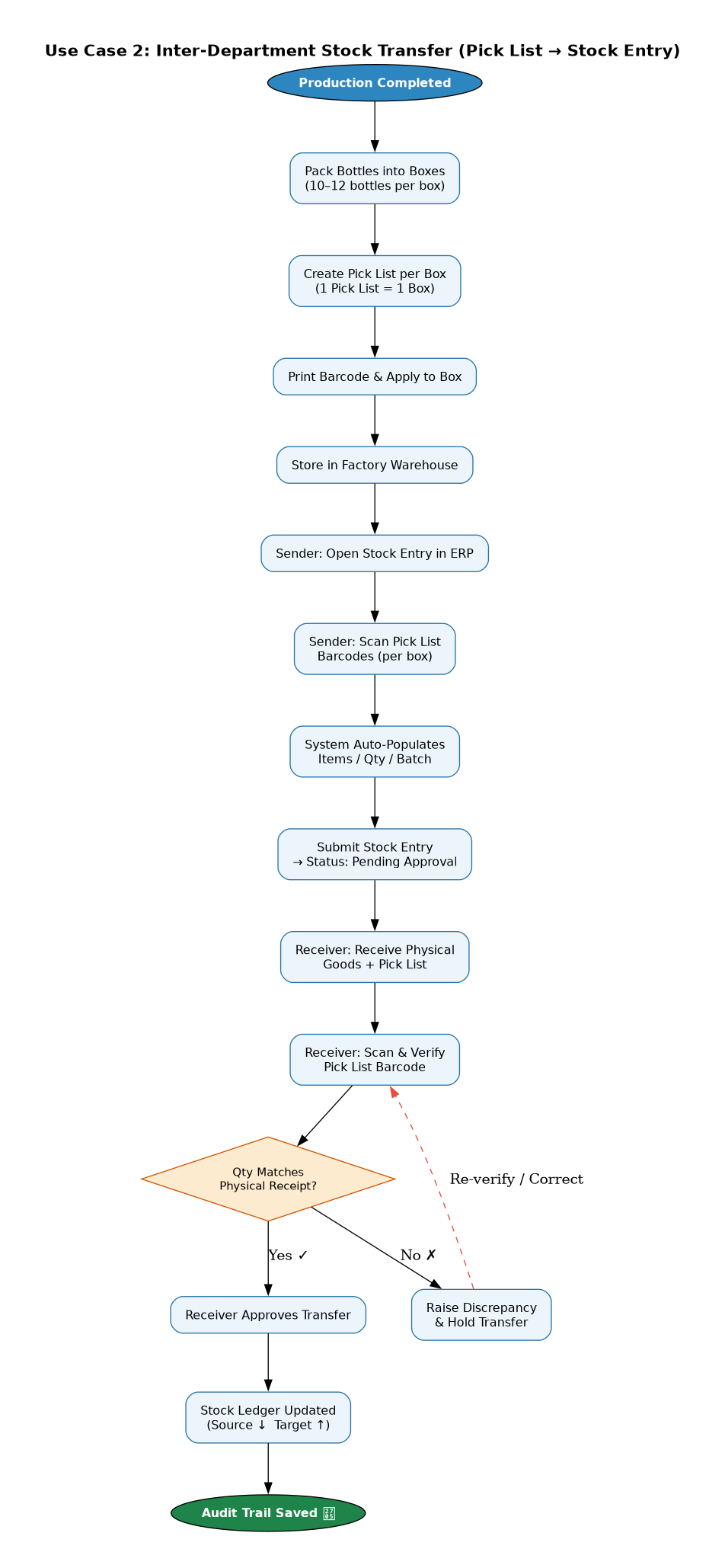
Key Concept: 1 Pick List = 1 Box = 1 Barcode
Each box/carton of finished goods gets its own Pick List with a unique barcode. This is created during production when bottles are packed.
Manufacturing Traceability (RM → FG)
The barcode system provides complete traceability from raw materials to finished goods:
| Stage | What's Tracked | Benefit |
|---|---|---|
| BOM Consumption | Which RM batches were used in production | Full ingredient traceability |
| FG Batch Creation | New batch number generated for finished goods | Unique identifier per production run |
| Box Barcode | Links to FG batch → links to consumed RM batches | End-to-end traceability |
Example — Quality Issue Recall:
1. Scan box barcode → Get FG Batch (e.g., BATCH-2025-001)
2. Check FG Batch → See RM batches consumed (e.g., RM-A-101, RM-B-205)
3. Trace RM batches → Identify supplier, PO, GRN details
4. Take action → Recall affected batches, notify parties
Pick List Structure
| Component | Description |
|---|---|
| Pick List | Document for 1 box |
| Box/Carton | Physical container |
| Contents | 10–12 bottles (FG) of same batch |
| Barcode | Unique Pick List barcode per box |
Example: 100 boxes produced = 100 Pick Lists created = 100 unique barcodes
Transfer Workflow (Step by Step)
Step 1 — Sender (Source Warehouse) - Open Stock Entry in ERP - Select transfer type and target warehouse - Scan Pick List barcodes (one per box) - System auto-populates items, quantities, batch numbers - Submit stock entry → status: Pending Approval
Step 2 — Receiver (Target Warehouse) - Receive physical goods with Pick List - Open pending stock entry in ERP - Scan Pick List barcode to verify contents - Confirm quantities match physical receipt - Approve the transfer
Step 3 — System - Only after receiver approval → stock ledger updated - Source warehouse stock decreases, target increases - Full audit trail maintained with Pick List reference
Approval System Benefits
| Problem | Solution |
|---|---|
| Sender records 10 items, receiver gets 8 | Discrepancy caught before ledger update |
| Wrong items picked for transfer | Scanning validates correct items |
| Physical vs. book stock mismatch | Dual verification ensures accuracy |
| Accountability gaps | Clear trail of who sent and who received |
Transfer Scenarios
| From | To | Example |
|---|---|---|
| Factory Warehouse | Master Depot | Tupran Pet → Rajamandi |
| Master Depot | Regional Depot | Rajamandi → Guntur |
| Regional Depot | Regional Depot | Guntur → Bangalore |
Use Case 3: Delivery Note Outwarding (Pick List → Delivery Challan)
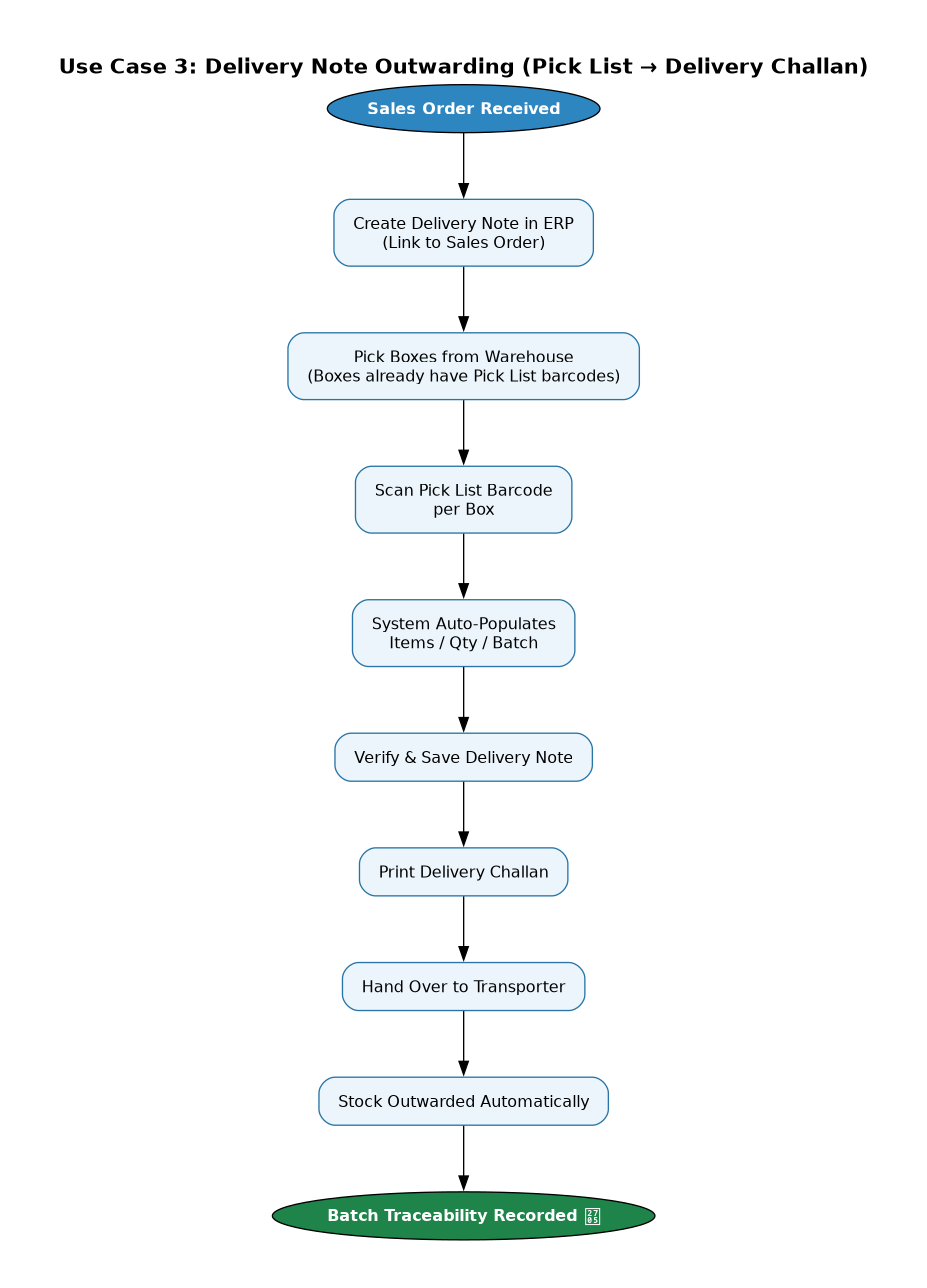
Pre-requisite: Each box already has a Pick List barcode from production. No new barcodes need to be created at dispatch time.
How It Works
- Sales Order — Receive customer order (e.g., 50 bottles = 5 boxes)
- Create Delivery Note — Open new Delivery Note in ERP, link to Sales Order
- Scan Pick Lists — Scan each box's Pick List barcode (5 scans for 5 boxes)
- Auto-Population — System fills items, quantities, batch numbers from scanned Pick Lists
- Verify & Save — Confirm details and save Delivery Note
- Print Challan — Generate delivery challan for transport
- Dispatch — Hand goods to transporter; stock automatically outwarded
Example
| Step | Action | Details |
|---|---|---|
| 1 | Calculate boxes | 50 bottles ÷ 10 per box = 5 boxes |
| 2 | Create Delivery Note | Link to Sales Order |
| 3 | Scan Pick Lists | 5 scans — one per box |
| 4 | Auto-populate | Product X, Qty: 50, Batch details |
| 5 | Save & Print | Delivery Note saved, Challan printed |
| 6 | Dispatch | 5 boxes handed to transporter |
Barcode Hierarchy
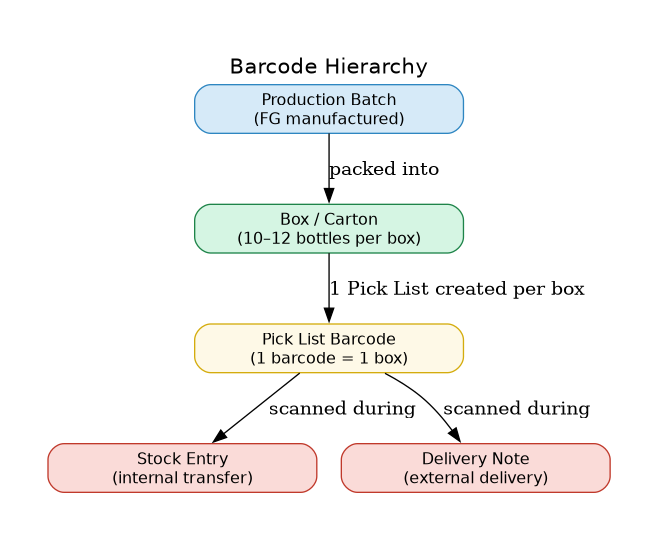
The Pick List barcode IS the box barcode. There is no separate box barcode.
Barcode Types Summary
| Use Case | Barcode Created At | Barcode Applied To | Scanned During | Outcome |
|---|---|---|---|---|
| RM Inwarding | PO Creation | Incoming packages (by supplier) | GRN | Auto-populate GRN items |
| Inter-Dept Transfer | Production/Packing | Pick List (1 per box) | Stock Entry | Track movement with approval |
| Delivery Outwarding | Production/Packing | Pick List (1 per box) | Delivery Note | Auto-populate challan items |
Scanning Process
How Scanning Works
The barcode scanner acts as a keyboard input device: 1. Place cursor in the barcode input field in ERP 2. Point scanner at barcode and trigger 3. Scanner "types" the value into the field 4. System processes barcode and auto-populates data 5. Input field clears automatically for the next scan
Scanner Specs
- Acts like a keyboard — no special drivers needed
- Automatically adds "Enter" after each scan
- Works with any web-based ERP system
- Supports both 1D barcodes and 2D QR codes
- Handles 100–150 items per session comfortably
Hardware Requirements
| Equipment | Specifications | Use Case |
|---|---|---|
| Wireless Barcode Scanner | USB dongle, keyboard emulation | Primary scanning at all locations |
| Desktop/Laptop | Web browser capable | ERP access |
| Thermal Label Printer | Label printing | Box labels and Pick List QR codes |
| Tablet (Optional) | Android/iOS browser | Mobile scanning in warehouse areas |
Cost Reference
- Basic wireless scanners: ₹4,000–5,000 per unit
Location-wise Setup
| Location | Equipment Needed |
|---|---|
| GRN / Receiving Area | Computer + Wireless Scanner + Printer |
| Factory Warehouse | Computer + Wireless Scanner |
| Each Depot | Computer + Wireless Scanner |
| Dispatch Area | Computer + Wireless Scanner + Printer |
ERP Customization Required
Use Case 1 — RM Inwarding
| Component | Development Required |
|---|---|
| Purchase Order | Barcode generation per line item |
| Packing Slip Format | Printable format with cut-out barcode labels |
| GRN (Purchase Receipt) | Barcode scan field with auto-population logic |
Use Case 2 — Inter-Dept Transfer
| Component | Development Required |
|---|---|
| Production/Stock Entry | Auto-generate unique barcode per box |
| Box Label Format | Print format for box barcode labels |
| Stock Entry (Transfer) | Barcode scan field + approval workflow |
| Approval Workflow | Dual-checkpoint approval (sender → receiver) |
Use Case 3 — Delivery Outwarding
| Component | Development Required |
|---|---|
| Pick List DocType | QR code generation after box scanning |
| Pick List Print Format | Format with QR code for shipment |
| Delivery Note | Pick List barcode scan + auto-population |
Implementation Phases
| Phase | Use Case | Priority | Rationale |
|---|---|---|---|
| Phase 1 | Inter-Department Transfers | 🔴 High | Core requirement for stock accuracy |
| Phase 2 | Delivery Note Outwarding | 🟡 Medium | Extends Phase 1; uses same box barcodes |
| Phase 3 | Raw Material Inwarding | 🟢 Lower | Requires supplier coordination |
Phase 1 Steps
- Finalize box barcode format and numbering scheme
- Develop barcode generation during production entry
- Set up label printing workflow
- Develop Stock Entry scanning functionality
- Configure approval workflow
- Pilot at one location (Factory → Master Depot)
- Train users and refine process
- Roll out to all depots
Next Steps & Action Items
Immediate (Week 1–2)
| # | Action | Responsible |
|---|---|---|
| 1 | Review documentation with MD and operations team | Kaushik |
| 2 | Gather feedback from dispatch team (Isaac, Rajesh) | Kaushik |
| 3 | Assess supplier capability for barcode labeling | Chinmay |
| 4 | Hardware effort-benefit analysis | Chinmay |
Development (Week 2–4)
| # | Action | Responsible |
|---|---|---|
| 5 | Develop Pick List barcode generation logic | Chinmay |
| 6 | Implement batch-level tracking in ERP | Chinmay |
| 7 | Configure approval workflows for stock transfers | Chinmay |
| 8 | Develop scanning integration for Stock Entry | Nikhil, Gaurav |
| 9 | Implement auto-populate logic for case/batch scanning | Nikhil, Gaurav |
| 10 | Test barcode scanning for Delivery Note | Nikhil, Gaurav |
Hardware & Rollout (Week 2–6+)
| # | Action | Responsible |
|---|---|---|
| 11 | Finalize hardware requirements and procurement | Client Team |
| 12 | Pilot at one location (Factory → Master Depot) | Both Teams |
| 13 | User training and process refinement | Both Teams |
| 14 | Full rollout to all depots | Both Teams |
Glossary
| Term | Definition |
|---|---|
| FG | Finished Goods — completed products ready for sale |
| RM | Raw Materials — inputs used in manufacturing |
| BOM | Bill of Materials — list of components needed to manufacture a product |
| GRN | Goods Receipt Note — document confirming receipt of purchased goods |
| PO | Purchase Order — document ordering goods from supplier |
| Pick List | Document representing one box/carton for shipment |
| Stock Entry | ERP transaction recording stock production or movement |
| Delivery Note | Document for outward dispatch of goods to customer |
| Challan | Transport document accompanying goods during delivery |
| Batch Number | Unique identifier for a production run enabling traceability |
| QC | Quality Control — process of verifying product quality |
Prepared by Hybrowlabs Technologies | ERPNext Implementation Partner For queries: chinmay.kulkarni@hybrowlabs.tech
Title
Content
