



Development Process
This page explains how Hybrowlabs manages software development for ERPNext customisations and product features — from idea to production. The process is designed around clarity, AI-assisted speed, and code quality.
🎥 Watch the walkthrough: Overview of PRD and LLD Usage in AI Coding Development
Workflow Overview

1. Kanban Board & Sprint Planning
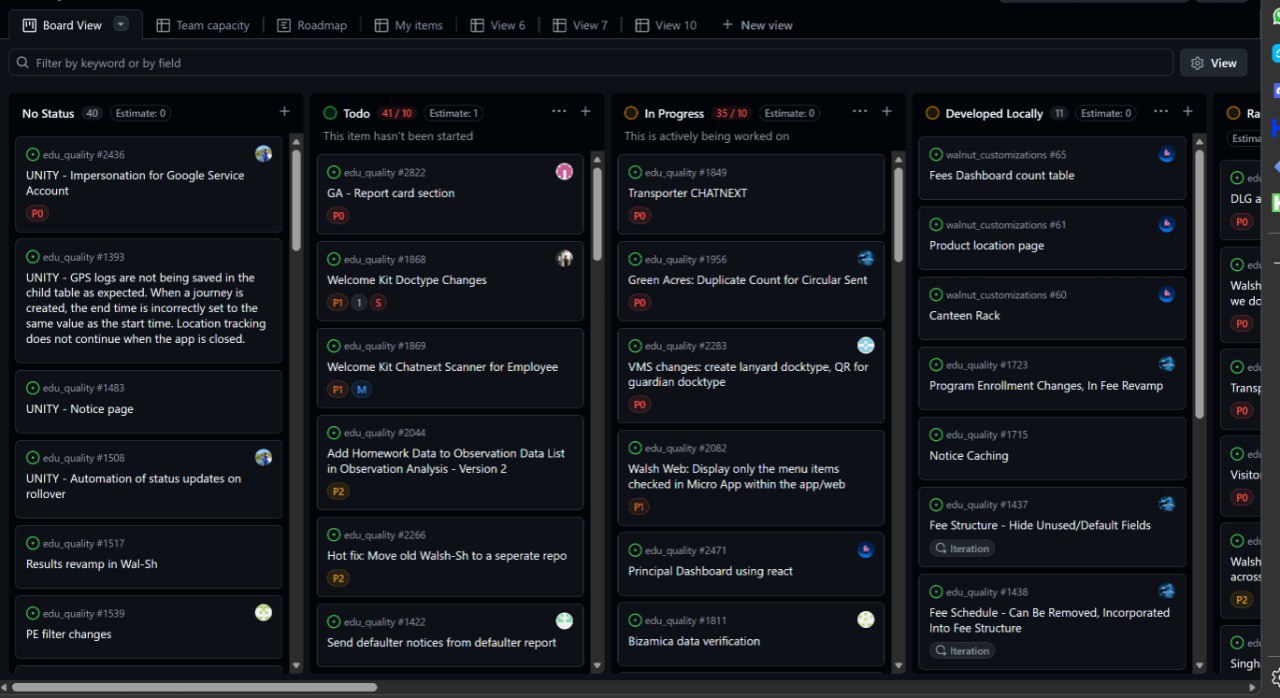
All development work is tracked on a Linear Kanban board using one-week agile sprints. Each sprint begins with a planning session where tickets are pulled from the backlog, prioritised, and assigned to developers.
Ticket priority levels:
| Priority | Label | Meaning |
|---|---|---|
| Critical | P0 | Blocking — must be resolved immediately |
| High | P1 | Important — must be in current sprint |
| Normal | P2 | Standard sprint work |
Kanban columns: No Status → Todo → In Progress → Developed Locally → In Review → Done
2. Ticket Creation — GitHub Issues
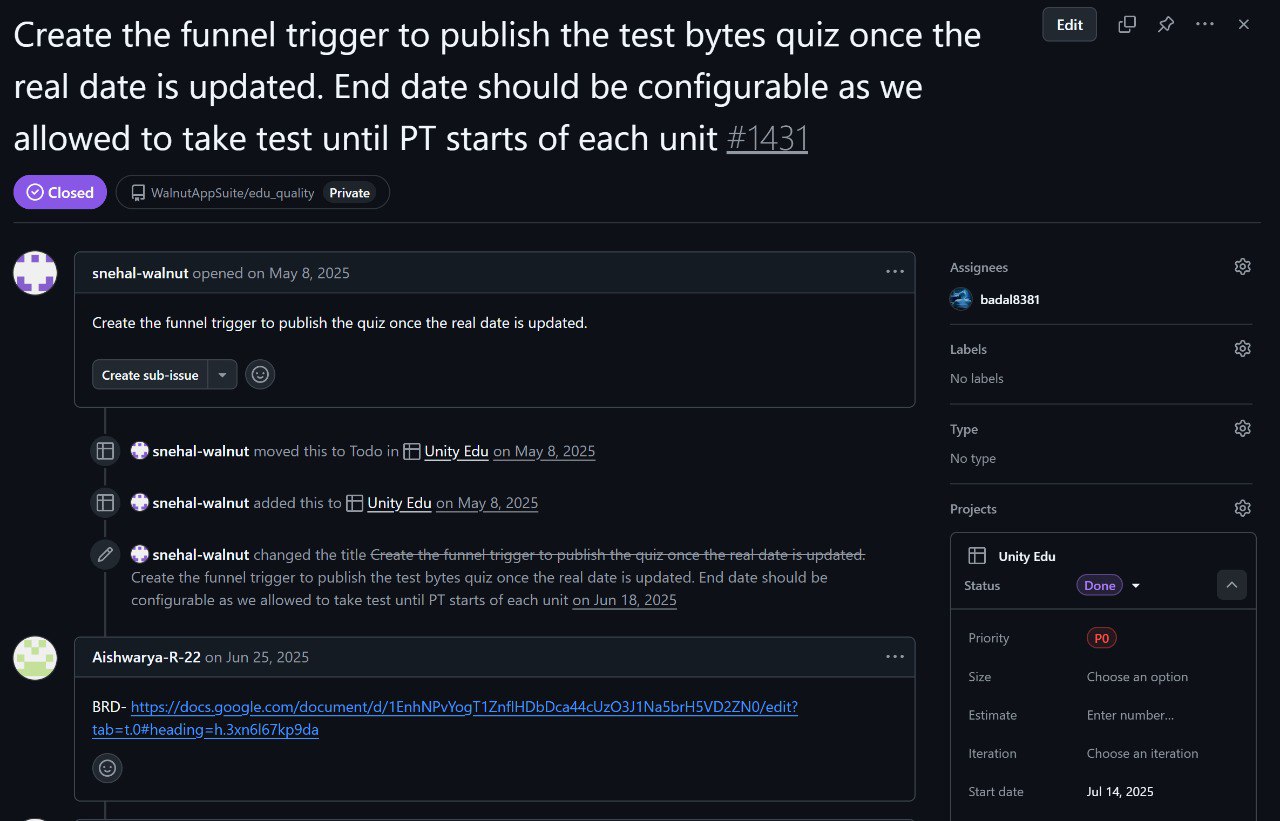
Every feature or bug is raised as a GitHub Issue. The issue contains: - Clear title and description of the requirement - Link to the PRD (Google Doc or Markdown file) - Assignee, milestone, and project board tag - Labels (enhancement, bug, etc.)
3. Documentation Chain: SOP → PRD → LLD
Before any code is written, three documents are produced in sequence. This is the backbone of quality at Hybrowlabs.
3.1 SOP — Standard Operating Procedure
An SOP describes how a business process works — the rules, roles, and steps involved. It gives context to the developer about the real-world workflow they are automating.
3.2 PRD — Product Requirements Document
The PRD translates the SOP into what the software must do — features, user stories, acceptance criteria, edge cases.
- Previously: Written in Google Docs (still used for complex, narrative-heavy requirements)
- Now (AI era): Written in Markdown directly in the GitHub repository, alongside the codebase
This shift means the PRD travels with the code, is version-controlled, and can be directly consumed by AI coding assistants.
Real-World PRD Examples
The following are real PRDs written by Hybrowlabs business analysts. These can be used as reference templates for your own projects.
| PRD | Description | Download |
|---|---|---|
| PRD — Project Document Request System | Document collection system for requesting, collecting, and managing project-specific documents from clients via secure portals. | ⬇️ Download |
| PRD — Engagement Management & Automated Billing | Retainer-based client engagement management with automated Sales Order generation, billing lifecycle, and revenue tracking. | ⬇️ Download |
| PRD — Project Contact Management | Contact management for ERPNext Projects — multiple contact types, communication preferences, and auto-linking to customers. | ⬇️ Download |
These PRDs are written in Markdown and stored in the GitHub repository alongside the codebase. They follow the format described in Section 3.2 above.
3.3 LLD — Low-Level Design
The LLD is an internal technical document written by the developer after reading the PRD. It is not intended for clients or product stakeholders — it exists purely as a developer-to-developer communication and control tool.
The lead developer uses the LLD to define exactly how a feature must be built, giving junior developers a precise blueprint to follow. It removes ambiguity, prevents ad-hoc decisions in code, and ensures the AI coding assistant generates accurate, contextual output.
An LLD at Hybrowlabs is an amalgamation of code structure and logic — it describes: - Files to be created or modified - DocType schema changes - Function signatures and logic flow - Database queries and API endpoints - Integration points and edge case handling
Audience: Developers only. Clients and product people work with PRDs. The LLD is the lead developer's tool to control the workflow and code quality of the team — including what the AI builds.
Sample LLD for reference (internal): - 📄 Sample LLD — Markdown format (GitHub)
4. AI-Assisted Development
Once the LLD is signed off, it is fed to Claude Code (or another AI coding assistant). The AI reads the LLD and generates:
- New DocType definitions
- Python controller logic
- JavaScript front-end customisations
- API methods and hooks
- Migration scripts if needed
The developer does not start from scratch — they start from a working AI-generated baseline and refine it. This dramatically reduces time-to-first-working-version.
With a well-written LLD, the AI can build a complete feature in one pass — the quality of the LLD directly determines the quality of the output.
5. Developer Review & Local Testing
After AI generation, the developer:
- Reviews all generated code line by line
- Runs the feature on their local bench site
- Fixes any edge cases or logic errors
- Writes integration tests where applicable
- Ensures the output matches the LLD and PRD acceptance criteria
6. Pull Request & Code Review
The developer raises a GitHub Pull Request linking back to the original issue. Two review mechanisms run in parallel:
6.1 Manual Review
A peer developer or tech lead reviews the PR for: - Business logic correctness - Code style and Frappe conventions - Security and permission checks - Performance considerations
6.2 AI Code Review — CodeRabbit
CodeRabbit automatically reviews every PR and posts a structured summary including: - Feature summary — what the PR does in plain English - Changes table — files modified, DocType schema changes, patch scripts - Sequence diagram — auto-generated flow of the new logic - Estimated review effort — complexity and time estimate - Actionable comments — specific line-level suggestions
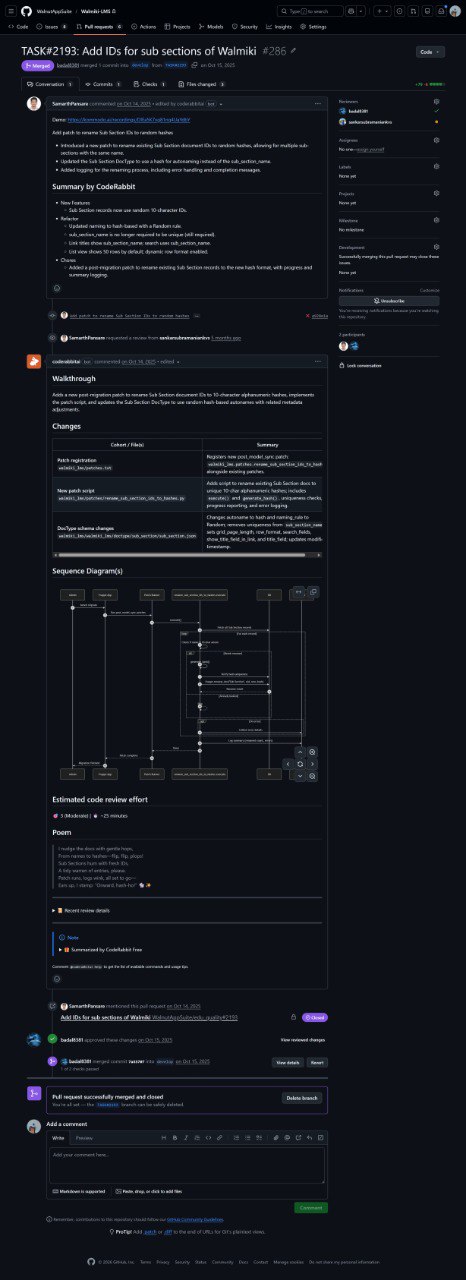
Both reviews must pass before a PR is merged.
7. Merge, QA & Deploy
Once approved:
- PR is merged to the main branch
- QA tests the feature on the staging site
- Integration tests are run (if written)
- Feature is deployed to production via
bench update
Summary
| Stage | Who | Tool |
|---|---|---|
| Ticket creation | BA / Product | GitHub Issues + Linear |
| SOP writing | BA | Google Docs / Notion |
| PRD writing | BA | Markdown on GitHub |
| LLD writing | Developer | Markdown on GitHub |
| Development | AI + Developer | Claude Code |
| Local testing | Developer | Frappe Bench |
| PR & review | Developer + Peer + AI | GitHub + CodeRabbit |
| QA & deploy | QA + DevOps | Bench + Frappe Cloud |