



Integration Capability
Summary: Frappe has a powerful, auto-generated REST API for all DocTypes, plus webhooks, event streaming, and a growing ecosystem of connectors. GST e-invoicing, payment gateways, and government API integrations are available via the India Compliance app and community apps.
- ✅ REST API: Auto-generated REST API for every DocType at /api/resource/{doctype}. Full CRUD support.
- ✅ Authentication: API key + secret token authentication. OAuth2 tokens also supported.
- ⚠️ GraphQL: Available via frappe-graphql community app; not built into core.
- ❌ SOAP: Not native; implement via custom Python wrapper using zeep or suds.
- ✅ API Versioning: /api/method/ whitelisted methods; version management via app architecture.
- ✅ Webhooks: Built-in Webhook doctype — configure per-DocType, per-event (create/update/submit). Outbound HTTP POST to any endpoint.
- ✅ Event Streaming: Built-in Event Streaming (v12+) for cross-instance real-time sync.
- 🔧 Message Queues: Redis Queue (RQ) for async tasks. Kafka integration possible for enterprise event streaming.
- 🔧 ESB/EAI: No built-in ESB; integrate with Mulesoft/WSO2 via REST API.
- ✅ Payment Gateways: Razorpay, PayPal, Stripe integrations available (Frappe Cloud Marketplace + community apps). Custom webhook-based integrations for others.
- ✅ GST Portal (e-Invoicing): India Compliance app provides GST e-invoicing (IRN/QR code), e-way bills, GSTR-1/2B/3B reconciliation, and NIC portal integration.
- ⚠️ Banking APIs: Manual bank statement import or third-party apps (e.g., Bank Integration apps in marketplace). Real-time bank feeds require custom integration.
- 🔧 Aadhaar/DigiLocker: No native connector; custom Python app using government APIs (UID/UIDAI). Community solutions exist.
- ✅ RPA: Compatible with UiPath/Automation Anywhere via REST API.
Webhooks — Real-Time Event Delivery
Frappe Framework includes a built-in Webhook system that pushes real-time notifications to external services whenever a document event occurs — no custom code required. It is configured entirely through the Admin UI.
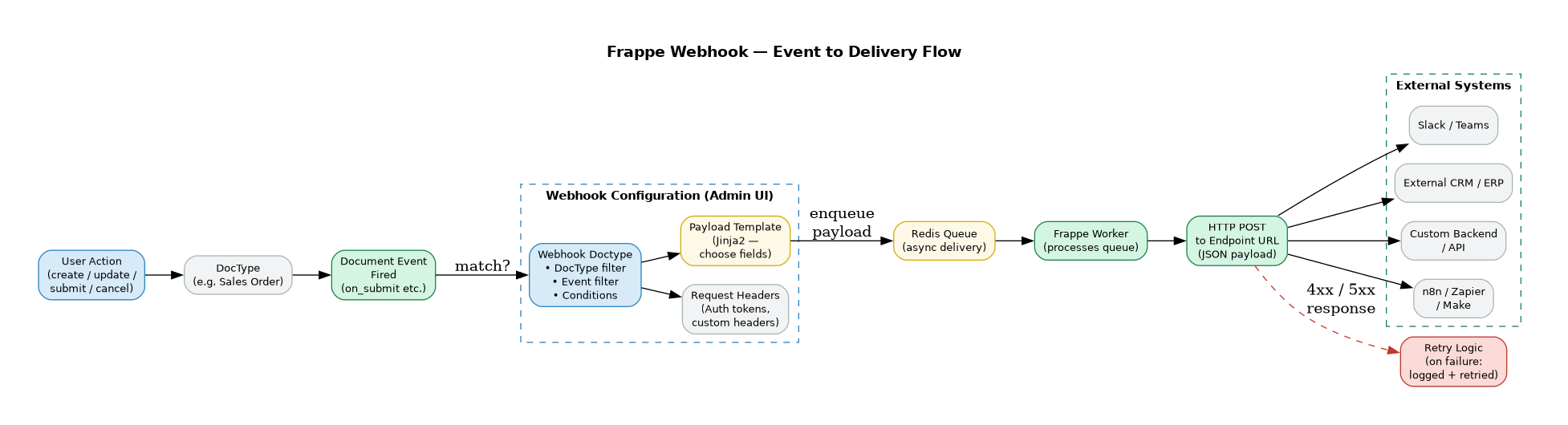
How It Works
When a document event fires (e.g. a Sales Order is submitted), Frappe checks all configured Webhooks to find any that match the DocType and event. If matched, it enqueues an HTTP POST job in Redis Queue. A background Frappe Worker picks it up and delivers the payload to the configured endpoint URL.
Delivery is asynchronous — the user action completes immediately and the webhook fires in the background without blocking the UI.
Webhook Configuration
Each Webhook is a DocType record with the following settings:
| Field | Description |
|---|---|
| Webhook URL | The external HTTPS endpoint to POST to |
| DocType | Which DocType to watch (e.g. Sales Order, Employee, Payment Entry) |
| Document Events | One or more events: after_insert, on_update, on_submit, on_cancel, on_trash |
| Conditions | Optional Jinja2 or Python expression to filter — e.g. only fire if doc.status == "Submitted" |
| Request Headers | Custom HTTP headers — use for Authorization: Bearer or API key auth to the receiving system |
| Payload Template | Jinja2 template to define exactly which fields are included in the JSON body |
| Enable / Disable | Toggle without deleting the configuration |
Payload
The default payload is a JSON object of the full document. Using the Payload Template, you can send only the fields the receiving system needs:
{
  "order_id": "{ doc.name }",
  "customer": "{ doc.customer }",
  "total": { doc.grand_total },
  "status": "{ doc.status }",
  "submitted_at": "{ doc.modified }"
}
Security
- HTTPS only — Frappe enforces HTTPS endpoints for webhook delivery
- Request Headers — pass bearer tokens, HMAC signatures, or API keys to authenticate with the receiving system
- IP Whitelisting — the receiving system can whitelist Frappe's server IP for additional security
Retry & Failure Handling
- If the endpoint returns a 4xx or 5xx response, Frappe logs the failure against the Webhook record
- Failed deliveries are visible in the Webhook Request Log DocType — with status, response code, and response body
- Administrators can manually re-trigger failed webhook requests from the log
- Repeated failures do not block the originating document action
Real-World Example — Webhook in Hybrowlabs ERPNext
The screenshot below shows an actual Webhook configured on our ERPNext instance. This webhook fires on after_insert of the Job Applicant DocType and posts a JSON payload to an external automation endpoint.
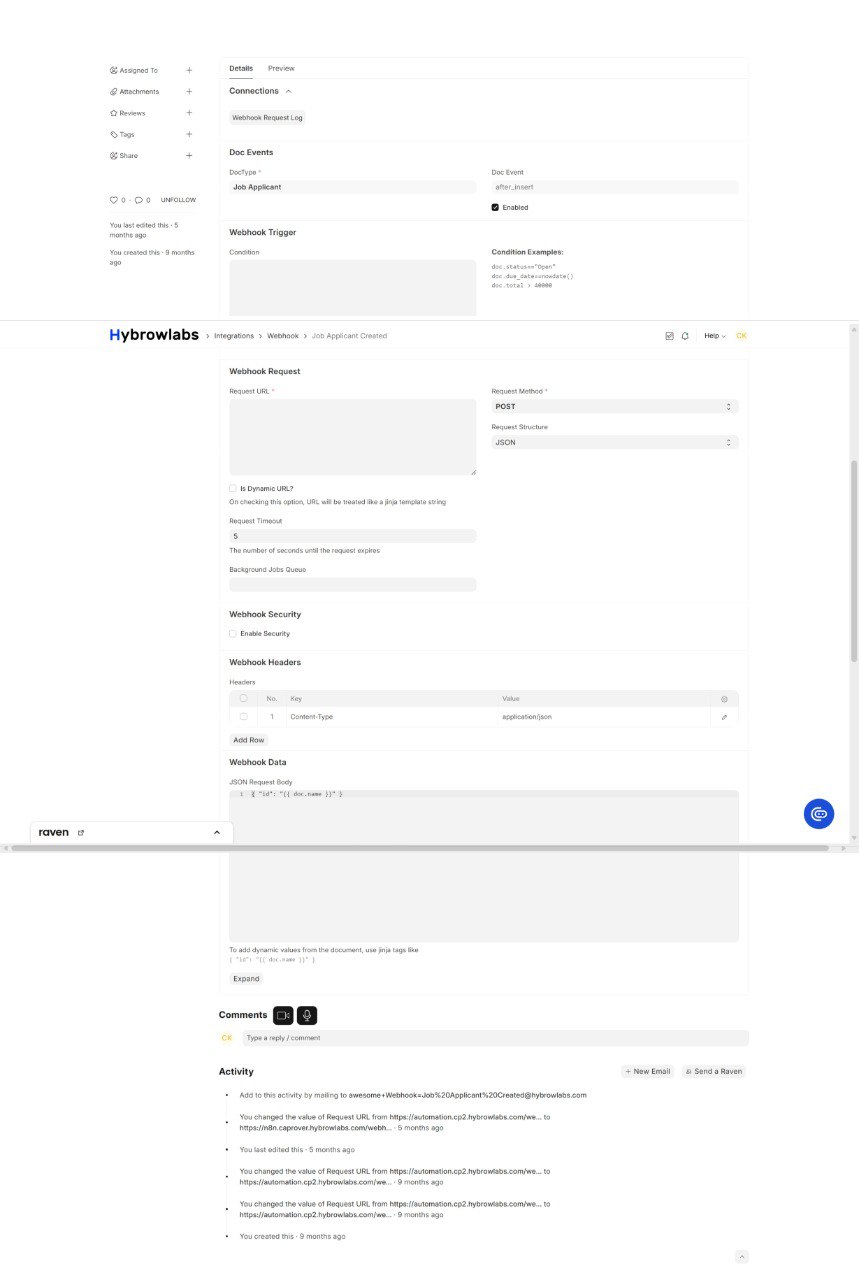
Key things to note from the configuration:
| Field | Value | Notes |
|---|---|---|
| DocType | Job Applicant | Watches this specific DocType |
| Doc Event | after_insert |
Fires when a new applicant is created |
| Enabled | ✅ | Active |
| Request Method | POST | Standard for webhooks |
| Request Structure | JSON | Payload format |
| Request Timeout | 5s | Fails fast if endpoint is down |
| Headers | Content-Type: application/json | Tells receiver to parse as JSON |
| JSON Body | [ {"id":"{{ doc.name }}"} ] |
Jinja2 template — doc.name is the document ID |
| Webhook Request Log | Linked | All delivery attempts logged here |
Common Use Cases
| Integration | Webhook Trigger | What Happens |
|---|---|---|
| Slack / Teams notifications | Sales Order on_submit |
A message is posted to a channel with order details |
| External CRM sync | Lead after_insert |
New lead is pushed to Salesforce / HubSpot |
| Payment gateway confirmation | Payment Entry on_submit |
External billing system is notified |
| Logistics system | Delivery Note on_submit |
Shipment is triggered in 3PL system |
| Automation platforms | Any event | n8n / Zapier / Make picks up the event and runs a workflow |
| Custom backend | Any event | Internal microservice receives real-time data without polling the ERPNext API |
Event Streaming vs Webhooks
Frappe also includes Event Streaming (available from v12+) for syncing data between two Frappe instances in real time — different from Webhooks which push to external non-Frappe systems.
| Feature | Webhooks | Event Streaming |
|---|---|---|
| Target | Any external HTTP endpoint | Another Frappe / ERPNext instance |
| Protocol | HTTP POST (JSON) | Frappe-to-Frappe API |
| Use case | Third-party integrations | Multi-instance ERPNext deployments |
| Configuration | Webhook DocType | Event Producer / Consumer DocTypes |
REST API Reference
📖 Full official docs: REST API Intro · Simple Auth · Token Auth · OAuth 2 · Listing · Manipulating
Frappe exposes two categories of HTTP endpoints:
| Type | Prefix | Purpose |
|---|---|---|
| RPC | /api/method/ |
Call any whitelisted Python method |
| REST | /api/resource/ |
CRUD on any DocType |
| REST v2 | /api/v2/document/ |
Richer REST interface (Frappe v15+) |
Base URL: https://{your-erpnext-instance} — all paths below append to this.
Authentication
Three methods are available. API Token auth is recommended for server-to-server integrations.
1. Session (Cookie) Auth
# Login — returns a `sid` cookie valid for 3 days
curl -X POST https://{instance}/api/method/login \
  -H 'Content-Type: application/json' \
  -d '{"usr":"Administrator","pwd":"admin"}'

# Logout
curl https://{instance}/api/method/logout
Use only for browser-based or short-lived scripts.
2. API Token Auth ✅ Recommended
Generate once per user: User list → Settings tab → API Access → Generate Keys. Copy the API Secret immediately.
# Header format
Authorization: token :
import requests
headers = {"Authorization": "token efaaf2d8fbac138:f3fb3c4ea507531"}
r = requests.get("https://{instance}/api/resource/Customer/CUST-00001", headers=headers)
Create a dedicated API user with minimal roles — all requests run under that user's permissions.
3. OAuth 2 (Bearer Token)
For user-delegated access (third-party apps acting on behalf of an ERPNext user).
Step 1 — Redirect user to authorise:
GET /api/method/frappe.integrations.oauth2.authorize
  ?client_id=YOUR_CLIENT_ID&response_type=code&scope=openid%20all
  &redirect_uri=https://yourapp.com/callback&state=random_value
Step 2 — Exchange code for token:
curl -X POST https://{instance}/api/method/frappe.integrations.oauth2.get_token \
  -H 'Content-Type: application/x-www-form-urlencoded' \
  -d 'grant_type=authorization_code&code=AUTHCODE&client_id=YOUR_CLIENT_ID&redirect_uri=https://yourapp.com/callback'
# Returns: access_token, refresh_token, expires_in (3600s)
Use the token: Authorization: Bearer
Refresh: resend with grant_type=refresh_token&refresh_token=...
Auth Methods Compared
| Method | Best for | Expiry |
|---|---|---|
| Session cookie | One-off scripts, browser | 3 days |
| API Token | Server-to-server integrations | Never |
| OAuth 2 Bearer | Third-party / user-delegated apps | 1 hour (refresh available) |
Listing Documents
# Basic list (name only, paginated 20/page by default)
GET /api/resource/Customer

# Select fields
GET /api/resource/Customer?fields=["name","customer_name","phone"]

# Filter
GET /api/resource/Customer?filters=[["Customer","country","=","India"]]

# Paginate — page 2
GET /api/resource/Customer?limit_page_length=50&limit_start=50
Filter operators: = != < > <= >= like not like in not in is is not
Response: { "data": [ { "name": "CUST-00001", ... } ] }
CRUD Operations
# CREATE
curl -X POST https://{instance}/api/resource/Lead \
  -H 'Authorization: token key:secret' -H 'Content-Type: application/json' \
  -d '{"lead_name":"Mustermann","email_id":"m@example.com"}'

# READ
curl https://{instance}/api/resource/Customer/CUST-00001 \
  -H 'Authorization: token key:secret'

# UPDATE (acts as PATCH — send only changed fields)
curl -X PUT https://{instance}/api/resource/Lead/LEAD-00001 \
  -H 'Authorization: token key:secret' -H 'Content-Type: application/json' \
  -d '{"contact_date":"2026-04-01"}'

# DELETE
curl -X DELETE https://{instance}/api/resource/Customer/CUST-00001 \
  -H 'Authorization: token key:secret'
RPC — Call Whitelisted Methods
# Any method decorated with @frappe.whitelist() is callable
GET /api/method/frappe.ping                          # { "message": "pong" }
GET /api/method/frappe.auth.get_logged_user          # { "message": "Administrator" }

# Call a custom method
curl -X POST https://{instance}/api/method/myapp.api.create_invoice \
  -H 'Authorization: token key:secret' -H 'Content-Type: application/json' \
  -d '{"customer":"CUST-00001"}'
API v2 — Extended Operations (Frappe v15+)
| Operation | Endpoint |
|---|---|
| List | GET /api/v2/document/{DocType} |
| Create | POST /api/v2/document/{DocType} |
| Read | GET /api/v2/document/{DocType}/{name}/ |
| Update | PATCH /api/v2/document/{DocType}/{name}/ |
| Delete | DELETE /api/v2/document/{DocType}/{name}/ |
| Copy | GET /api/v2/document/{DocType}/{name}/copy |
| Submit | POST /api/v2/document/{DocType}/{name}/method/submit |
| Cancel | POST /api/v2/document/{DocType}/{name}/method/cancel |
| Count | GET /api/v2/doctype/{DocType}/count |
| Metadata | GET /api/v2/doctype/{DocType}/meta |
Integration Best Practices
- Use API Token auth — stateless, no session management
- Dedicated API user with minimal permissions per integration
- Loop with
limit_page_length+limit_startfor bulk fetches — never assume 20 records is all there is - Handle
403gracefully — the API user lacks permission for that DocType or document - Prefer webhooks over polling — configure
after_insertwebhook to push to your endpoint instead of polling for new records - Never use a production API key in dev/test scripts