



Performance and Security
Presentation | Hybrowlabs Technologies
Framework: Frappe v16 / ERPNext v16
Tech Stack: Python + JavaScript (full-stack) | MariaDB (primary DB) | Redis (cache + queue) | NGINX + Gunicorn | MIT License (open source)
SaaS Offering: Frappe Cloud | CLI Tool: Bench | Architecture: Multi-tenant, DocType-driven, event-based
3. Performance
Summary: ERPNext v16 with Frappe Caffeine delivers dramatically improved performance — 4x faster API responses and 3.75x faster list views — through an intelligent Redis-based caching layer. Standard operations complete well under 200ms.
- ✅ Avg Transaction Response Time: ~45ms API response (ERPNext v16 with Frappe Caffeine vs. 180ms in v15).
- ✅ List View Performance: 120ms for 100,000 records (v16) vs. 450ms (v15) — 3.75x improvement.
- ✅ Report Generation: Complex reports: ~5.2s (v16) vs. 12.5s (v15) — 2.4x improvement.
- ✅ Frappe Caffeine: New high-performance Redis caching layer in v16; offloads read-heavy operations from MariaDB.
- ✅ Batch Processing: Background workers (RQ/Redis Queue) for async bulk operations; separate job worker nodes for heavy processing.
- ✅ Redis Caching: Multi-layer caching (page cache, metadata cache, session cache). Redis is mandatory, not optional.
- ✅ Large Dataset Handling: MariaDB tuning (innodbbufferpool_size, SSD IOPS, slow query logs + indexing).
- ⚠️ Sharding: Not native; use read replicas + partitioning for large tables.
- ❌ Published TPC Benchmarks: No official TPC-C/TPC-H benchmarks published; community benchmarks available for specific workloads.
- 🔧 Performance Tuning: Requires MariaDB + Redis + NGINX + Gunicorn configuration for production-grade deployments.
4. Availability & Reliability
Summary: Frappe Cloud targets high availability using AWS multi-AZ infrastructure with automatic failover. Self-hosted deployments require manual HA setup. Backups are automated with S3 offsite storage.
- ✅ Uptime (Frappe Cloud): Inherits AWS multi-AZ SLA of 99.99% (multi-AZ) / 99.5% (single AZ).
- ⚠️ Frappe-Published Uptime SLA: No explicit 99.9% SLA commitment published by Frappe for hosted plans; based on AWS infrastructure.
- ✅ Automatic Failover: MariaDB master-replica with automatic failover using tools like Orchestrator or ProxySQL.
- ✅ Cluster Support (Active-Passive): Master-replica MariaDB cluster; Redis Sentinel for Redis HA.
- ⚠️ Active-Active Cluster: Not natively supported for MariaDB; Galera Cluster possible but complex.
- ✅ Backup Frequency: Frappe Cloud: daily automated backups to Amazon S3. Self-hosted: configurable via bench cron.
- ✅ Restore Testing: bench restore command for site restoration. Frappe Cloud: support-assisted restores.
- ⚠️ RTO/RPO (Frappe Cloud): Not explicitly published; community-reported RTO ~4h for critical issues per support SLA.
- 🔧 Self-Hosted HA: Requires setup of NGINX load balancer + MariaDB replica + Redis Sentinel + shared file storage (NFS/S3).
5. Security
Frappe / ERPNext provides enterprise-grade security across five layers: Identity & Authentication, Access Control, Encryption, Audit & Monitoring, and Network & Infrastructure Security. Frappe Cloud holds its own independent certifications — SOC 2 Type II and ISO 27001:2022 — attested by third-party auditors.
5.1 Certifications & Compliance
| Certification | Holder | Status |
|---|---|---|
| SOC 2 Type II | Frappe Cloud (own certificate) | ✅ Independently attested |
| ISO 27001:2022 | Frappe Cloud | ✅ Certified |
| GDPR | Frappe Cloud | ✅ Compliant (AWS EU region available) |
| VAPT | Frappe Cloud infrastructure | ✅ Available upon request (post NDA) |
| DDoS Protection | Frappe Cloud | ✅ AWS Shield + OCI mitigation |
Note: Frappe Cloud holds its own SOC 2 Type II certificate — view the report. — not an inherited attestation from AWS. This means Frappe's own operational controls (access management, change management, availability, confidentiality) have been independently audited and certified.
5.2 Authentication & Identity
Every request to ERPNext must be authenticated. Frappe supports multiple authentication methods, all converging into a single encrypted session token before the user reaches the application.

Local Authentication Passwords are hashed using PBKDF2 + SHA256 with per-user salting. Frappe enforces configurable password policies (minimum length, complexity, expiry). Failed login attempts trigger lockout after a configurable threshold.
SSO via LDAP / Active Directory Frappe connects to corporate LDAP or Active Directory servers for single sign-on. User groups from AD can be mapped to Frappe Roles automatically, so access control stays in sync with HR systems.
OAuth2 Frappe includes a full OAuth2 authorization server and client implementation. Users can log in via Google, GitHub, Microsoft, or any custom OAuth2 provider. API clients can authenticate using OAuth2 bearer tokens without exposing username/password.
MFA / TOTP Time-based One-Time Passwords (TOTP) are supported natively — compatible with Google Authenticator, Authy, and any TOTP-compliant app. MFA can be enforced per-role or system-wide.
SAML Not built into Frappe core, but achievable via a custom app or third-party identity provider (e.g. Okta, Azure AD) using an OAuth2 bridge.
5.3 Access Control — RBAC & Field-Level Permissions
Frappe implements a multi-layer permissions model. Access is never granted by default — it must be explicitly assigned through Roles.
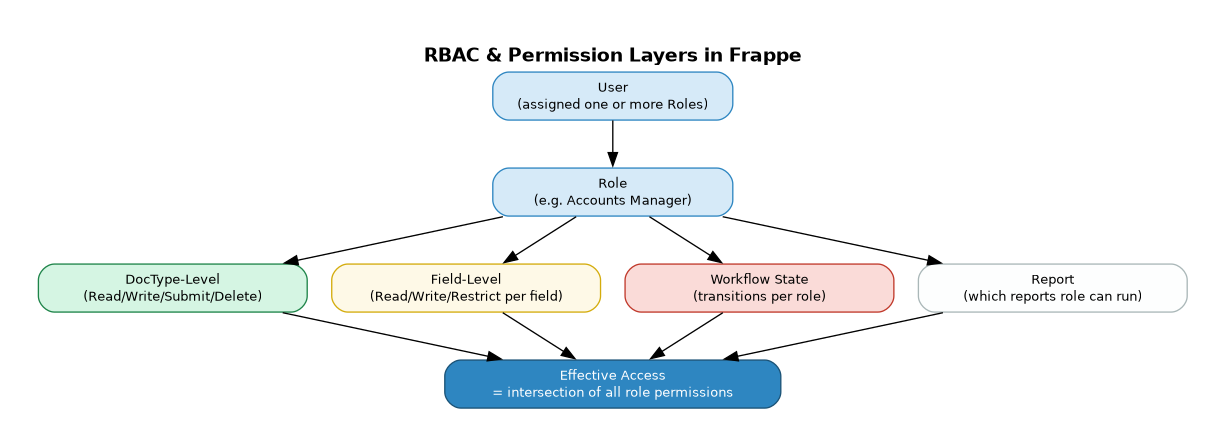
Role-Based Access Control (RBAC) Every user is assigned one or more Roles. Each Role carries permissions defined at four levels:
| Level | What it controls |
|---|---|
| DocType | Whether the role can Read, Write, Create, Submit, Amend, or Delete a document type |
| Field | Per-field: whether the role can Read, Write, or is restricted from seeing the field entirely |
| Workflow State | Which workflow transitions (e.g. Draft → Submitted) the role is allowed to trigger |
| Report | Which reports the role can run and export |
If a user has multiple roles, their effective access is the union of all role permissions — but field-level restrictions apply strictly regardless.
Field-Level Security Sensitive fields (e.g. salary, bank account, Aadhaar) can be configured as: - Read-only for certain roles - Hidden entirely from the form - Restricted — visible but not printable or exportable
Data Masking Fields can be masked at the display layer using custom scripts — showing only the last 4 digits of a bank account, or replacing a full name with initials in list views for non-authorised roles.
5.4 Encryption — In Transit & At Rest
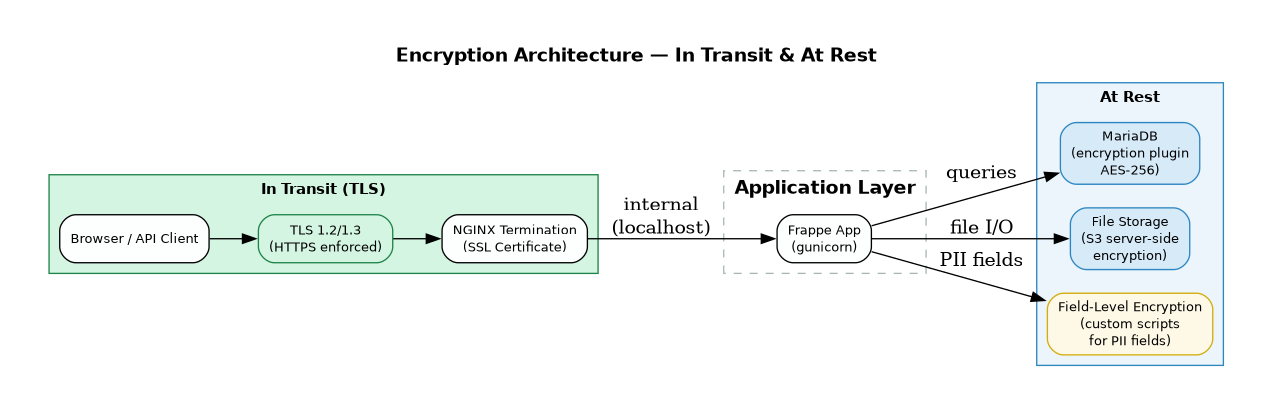
In Transit All communication between clients and the Frappe server is encrypted using TLS 1.2 or 1.3. NGINX terminates SSL at the edge. HTTP is redirected to HTTPS — there is no unencrypted access path in production.
At Rest — Database MariaDB supports transparent data encryption via the encryption plugin, using AES-256. This encrypts tablespaces, redo logs, and binary logs on disk. Even if the physical storage is compromised, the data is unreadable without the encryption key.
At Rest — File Storage Files uploaded to Frappe (attachments, exports, backups) can be stored on S3-compatible storage with server-side encryption enabled. Frappe Cloud uses S3 with AES-256 encryption by default.
Field-Level Encryption For particularly sensitive fields (e.g. API secrets, PII), custom Python scripts can encrypt values before storage and decrypt on retrieval, keeping ciphertext in the database even if DB-level encryption is not in scope.
5.5 Audit Logs & Activity Monitoring
Frappe maintains a full audit trail of every action taken in the system. This is critical for compliance, forensics, and access reviews.
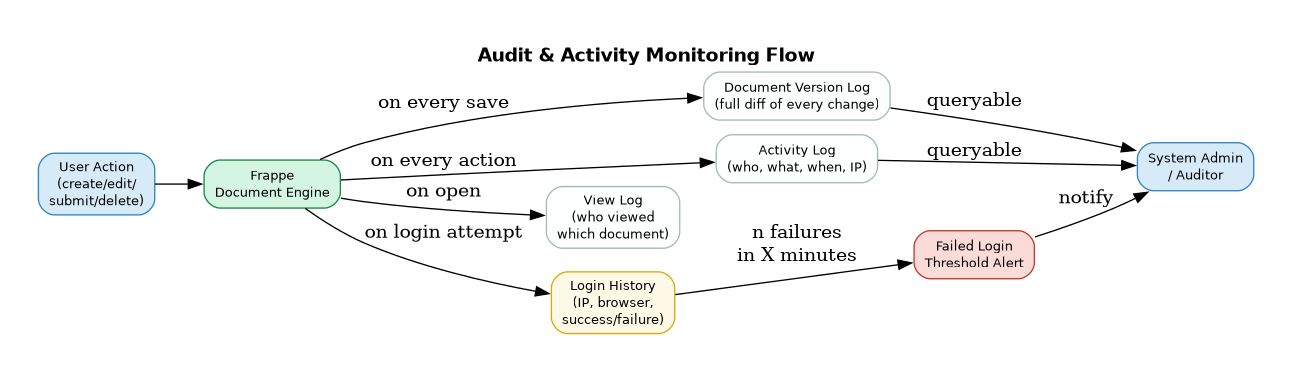
Document Version Log Every time a document is saved, Frappe stores a complete diff — who changed what, from what value, to what value, and when. This can be viewed inline on any document and exported. Enabled per-DocType via Customize Form.
Activity Log Every create, update, submit, cancel, amend, and delete action is recorded with user, timestamp, and document reference.
View Log Every time a user opens a document, the view is logged — providing a read-access audit trail in addition to write actions.
Login History All login attempts are recorded — IP address, browser, timestamp, success or failure. Failed login thresholds trigger automatic alerts to system administrators.
IP Restrictions Administrators can whitelist or blacklist specific IP ranges. Access from unauthorised IPs can be blocked at the application level, independent of firewall rules.
5.6 Network & Infrastructure Security
See the dedicated page: Network & Infrastructure Security
5.7 Roles & Permissions — Deep Dive
Frappe's permission system is declarative, layered, and enforced at every tier — from the HTTP request down to the SQL query. Access is deny-by-default: a user can only do what their roles explicitly permit.
How Roles Work
A Role in Frappe is a named collection of permissions. Users are assigned one or more Roles. The system computes an effective permission set that is the union of all their roles for each DocType.
| Concept | Description |
|---|---|
| Role | Named group (e.g. "HR Manager", "Accounts User") — carries permissions |
| User | Has one or more Roles assigned |
| Role Profile | A template that assigns a bundle of Roles in one step (used for onboarding) |
| DocType Permission | Defines what a Role can do on a specific document type |
| Permission Level (perm_level) | A number (0–9) assigned to both fields and role rules — used for column-level security |
Standard Permission Actions
For each DocType, each Role can be granted or denied:
| Permission | Meaning |
|---|---|
| Read | View the document in list and form |
| Write | Edit and save the document |
| Create | Create new documents of this type |
| Delete | Permanently delete documents |
| Submit | Submit a document (locks it for further edits) |
| Cancel | Cancel a submitted document |
| Amend | Create a new version of a cancelled document |
| Report | Run reports on this DocType |
| Export | Export data to Excel/CSV |
| Import | Bulk import data via CSV |
| Share | Share documents with other users |
| Print or download as PDF | |
| Send the document via email directly |
Permission Evaluation Flow
User Request (e.g. GET /api/resource/Employee/EMP-001)
        ↓
1. Is user logged in + session valid?          [Authentication]
        ↓
2. Does any Role of this user have Read        [DocType-level RBAC]
   permission on Employee DocType?
        ↓
3. Does this user have a User Permission       [Row-Level Security]
   that restricts access to this Employee?
        ↓
4. For each field in the response,             [Column-Level Security]
   does the user's Role allow perm_level?
        ↓
5. Return filtered document                    [Output]
Every layer is checked for every request — skipping any layer is not possible without a deliberate developer override (ignore_permissions=True).
Setting Up Roles
Roles are managed via Setup → Users → Role. Permissions are configured via Setup → Permissions → Role Permissions Manager or directly in Customize Form for field-level rules.
5.8 Row-Level Security — User Permissions
Row-Level Security in Frappe is implemented via the User Permissions system. It restricts which documents a user can see and interact with, even if their Role grants access to the DocType.
Concept
A User Permission is a rule that says:
"This user can only access documents where field [X] equals [Y]."
For example:
- User: rahul@company.com → Company = Acme Corp
Rahul will only see documents linked to "Acme Corp", even if his Role allows access to all Companies.
- User: sales.rep@company.com → Territory = India
The sales rep only sees Leads, Opportunities, and Orders where Territory = India.
How It Works Technically
When a user with User Permissions fetches a list, Frappe injects a WHERE clause into the SQL query automatically:
-- Without User Permission:
SELECT * FROM `tabSales Order` WHERE docstatus < 2;

-- With User Permission (Territory = India):
SELECT * FROM `tabSales Order`
WHERE docstatus < 2
AND territory = 'India';
This happens at the ORM level — it cannot be bypassed via the API without explicitly setting ignore_permissions=True in server-side code (a developer-level action).
Applying User Permissions
User Permissions are set via Settings → Users → User Permissions:
| Field | Description |
|---|---|
| User | The specific user this restriction applies to |
| Allow | The DocType being restricted (e.g. "Company", "Territory", "Department") |
| For Value | The allowed value (e.g. "Acme Corp", "India", "HR") |
| Apply To All DocTypes | If checked, applies across all DocTypes that link to the specified DocType |
| Applicable For | Optionally narrow to specific DocTypes only |
Cascading via Links
User Permissions cascade through document links. If a user has Company = Acme Corp, then any DocType with a Link field pointing to Company (e.g. Sales Order, Purchase Invoice, Employee) is automatically restricted to "Acme Corp" records — without needing separate rules per DocType.
This enables multi-entity isolation: a branch manager sees only their branch's data across the entire system without any custom code.
Ignoring User Permissions for Specific DocTypes
In some cases, a user should be restricted by Company but allowed to see all Customers regardless. This is handled via Role Permissions Manager by enabling "Ignore User Permissions" for that specific Role-DocType combination.
Example: Branch-Level Data Isolation
Setup:
  - User: branch.manager@company.com
  - Roles: "Branch Manager"
  - User Permission: Branch = "Mumbai"

Result:
  - Sales Orders  → filtered to Branch = Mumbai ✅
  - Purchase Orders → filtered to Branch = Mumbai ✅
  - Employees → filtered to Branch = Mumbai ✅
  - GL Entries → filtered to Branch = Mumbai ✅
  - Any DocType with a Branch link → automatically restricted ✅
5.9 Column-Level Security — Field-Level Permissions via Perm Level
Column-Level Security in Frappe is implemented via the Permission Level (perm_level) system on fields. It controls which Roles can read or write individual fields within a document — even if the Role has access to the document itself.
Concept
Every field in a DocType has a perm_level attribute (default: 0). Every Role Permission rule also specifies a perm_level. A Role can only access a field if its permission rule includes that level.
Think of it as clearance levels: - Level 0 — Standard fields (visible to anyone with Read access) - Level 1 — Sensitive fields (e.g. salary, HR notes) - Level 2 — Confidential fields (e.g. bank account, Aadhaar, PII) - Level 3–9 — Custom tiers for specialised access
How Perm Levels Work
Field: "Basic Pay"         → perm_level = 1
Field: "Bank Account No."  → perm_level = 2

Role: "HR User"
  - Read/Write at perm_level 0 ✅  (standard fields visible)
  - Read at perm_level 1 ✅        (can see salary)
  - No rule for perm_level 2 ❌    (bank account not returned by API)

Role: "Payroll Manager"
  - Read/Write at perm_level 0 ✅
  - Read/Write at perm_level 1 ✅
  - Read/Write at perm_level 2 ✅  (full access to bank account)
When an HR User opens an Employee record, the "Bank Account No." field is completely absent from the API response — stripped at the server before the JSON is sent. It is not just hidden in the UI; it is not transmitted at all.
Configuring Perm Levels
Step 1 — Set perm_level on fields (Customize Form):
Open any DocType in Customize Form → set Perm Level on each field (default 0, increase for sensitive fields).
Step 2 — Add perm_level rules to Roles (Role Permissions Manager): For each Role, add a permission rule at the relevant perm_level and assign Read and/or Write.
Example: Payroll Confidentiality
DocType: Employee

Field               perm_level   Who can see it
──────────────────────────────────────────────────
employee_name          0         Everyone with Read
department             0         Everyone with Read
date_of_joining        0         Everyone with Read
basic_pay              1         HR User and above
performance_band       1         HR User and above
bank_account_no        2         Payroll Manager only
aadhaar_number         2         Payroll Manager only
personal_notes         3         HR Head only
Field-Level Hide vs Perm Level — Key Difference
| Mechanism | Enforced at | Effect |
|---|---|---|
| Perm Level | Server (ORM + API) | Field stripped from API response — not transmitted |
| Read-Only (Role) | Server + UI | Field visible but not editable |
| Hidden (field property) | UI only | Not shown in form, but may still be in API response |
| Custom Script hide() | Browser only | Cosmetic only — field still in DOM and API |
⚠️ For true column-level security, always use Perm Level — not UI-only hide or read-only. Perm Level is the only mechanism enforced at the server and API layers.
Combining Row + Column Security
Row-level and column-level controls work simultaneously:
User: payroll.admin@company.com
Roles: "Payroll Manager"
User Permission: Company = "Acme Corp"

Effect:
  ┌─ Row-Level:    Only Employee docs where Company = "Acme Corp" are returned
  └─ Column-Level: Within those docs, fields up to perm_level 2 are returned
                   Fields at perm_level 3+ are stripped from the API response
This combination makes Frappe suitable for multi-entity, multi-role deployments where data must be isolated both by record ownership and by field sensitivity.
7. Security Assessment — Vendor Q&A
This section answers common enterprise security assessment questions for Frappe/ERPNext deployments. These responses are applicable to self-hosted and Frappe Cloud deployments unless stated otherwise.
7.1 Security Architecture
Q1. Resilience against data leakage, ransomware, and network reconnaissance
- Data Leakage: Role-based permissions are enforced at the ORM level — every database query is filtered by user roles and document-level permissions. No data is served outside the permission matrix. Ref: Frappe Permissions
- Ransomware: Frappe recommends self-hosted deployments behind a firewall with no direct DB exposure. File storage is isolated from web-accessible paths. Automated encrypted backups to offsite/S3 ensure recovery.
- Network Reconnaissance: Frappe's production setup runs Nginx as a reverse proxy — no application ports are exposed directly. Redis and MariaDB are bound to
localhostonly by default. Ref: Bench Production Setup
Q2. How do you test for security vulnerabilities?
- Automated CI/CD via GitHub Actions on every PR — includes unit and integration tests
- Dependabot for automated dependency vulnerability alerts on
frappe/frappeandfrappe/erpnext - CodeQL static analysis integrated into GitHub Actions for code-level vulnerability scanning
- Community-driven responsible disclosure via
security@frappe.io
Ref: Frappe GitHub Security Advisories
Q3. How frequently are vulnerability tests conducted?
- Automated scans run on every commit/PR via GitHub Actions
- Dependency audits run continuously via Dependabot
- Security patches released as part of monthly minor releases + ad-hoc hotfixes for critical CVEs
Ref: Frappe Releases
Q4. Can you share reports from the most recent security testing exercises?
Frappe publishes security advisories publicly: - frappe/frappe security advisories - frappe/erpnext security advisories
For enterprise deployments, Hybrowlabs can provide penetration test reports conducted on client-specific instances upon request.
Q5. How do you ensure no backdoors are introduced?
- Frappe is 100% open source (MIT licensed) — entire codebase publicly auditable on GitHub
- All changes go through mandatory PR reviews before merge
- No obfuscated or compiled code — Python source is always human-readable
- Customers and third parties can audit every line of deployed code
Repos: frappe/frappe | frappe/erpnext
Q6. Do customers conduct independent security testing?
Yes. Since Frappe is open source and self-hosted, customers are free to conduct their own penetration testing, engage third-party security firms, or review source code independently. Identified vulnerabilities can be reported to security@frappe.io or via GitHub Security Advisories. Frappe typically releases fixes within 30–90 days depending on severity.
Q7. Do you provide a Software Bill of Materials (SBOM)?
Frappe's dependencies are fully declared and auditable: - Python deps: requirements.txt - JS deps: package.json - ERPNext deps: erpnext/requirements.txt
A formal SBOM in CycloneDX or SPDX format can be generated using tools like cyclonedx-bom or syft on any deployed instance.
7.2 Software Components & Licensing
Q8. Third-party software components
| Component | Purpose |
|---|---|
| MariaDB / PostgreSQL | Database |
| Redis | Caching, queuing, real-time |
| Nginx | Reverse proxy |
| Python 3.10+ | Backend runtime |
| Node.js | Asset bundling |
| Celery | Background job processing |
| Socket.io | Real-time updates |
| Vue.js / jQuery | Frontend framework |
Q9. GPL or LGPL licensed components?
- Frappe Framework: MIT licensed — permissive, no copyleft obligations
- ERPNext: GNU GPLv3 — source must remain open if distributed
- MariaDB: GPL v2, used as a separate process (no license propagation to application code)
- No LGPL components statically linked into the application
Ref: Frappe License | ERPNext License
7.3 Infrastructure Security
Q10. Measures to secure enterprise network
- Nginx reverse proxy — only ports 80/443 exposed externally
- MariaDB and Redis bound to
127.0.0.1— not accessible externally - SSH hardening: key-based auth, fail2ban
- UFW/firewall rules as part of bench production setup
- Optional: VPN-only admin access, IP whitelisting for
/desk
Ref: Bench Firewall Guide
Q11. Internal access control to customer data
- RBAC: Every DocType has field-level, document-level, and role-level permissions (see Sections 5.7–5.9)
- User Permissions: Restrict which records a user can see based on linked document values
- Audit log: All document changes tracked in the Version doctype — who changed what and when
- 2FA: TOTP-based two-factor authentication available
7.4 Data Security
Q12. Data security at rest and in transit
- In transit: All traffic served over HTTPS/TLS via Nginx; HTTP is redirected to HTTPS
- At rest: Full-disk encryption at OS/cloud level (AWS EBS, LUKS). MariaDB Encryption at Rest plugin for tablespace-level encryption
- Backups: Compressed, optionally encrypted archives;
bench backup --with-filessupports S3/offsite upload
Q13. Encryption standards and protocols
- TLS 1.2 and 1.3 for all HTTPS traffic
- AES-256 for backup encryption (when configured)
- Passwords hashed using bcrypt via Python's
werkzeug.security - API keys stored with SHA-256 hashing
Q14. SSL/TLS version supported
- TLS 1.2 and TLS 1.3 (TLS 1.0/1.1 disabled by default in modern Nginx config)
- Cipher suites follow Mozilla's Intermediate compatibility profile
- Let's Encrypt / Certbot integration:
bench setup lets-encrypt
Ref: Bench SSL Setup
7.5 API Security
Q15. API security against session hijacking / unauthorized access
- Session tokens stored server-side; cookie is
HttpOnlyandSecure - CSRF protection on all state-changing requests via
X-Frappe-CSRF-Token - API key/secret authentication for programmatic access — keys are hashed, secrets never stored in plaintext
- Rate limiting configurable via Nginx
- IP-based session binding optionally configurable
- OAuth2 support for third-party integrations
Ref: Frappe REST API
7.6 Credential Management
Q16. Are credentials hard-coded?
No. Frappe uses site_config.json (stored outside the web root) for all sensitive configuration: DB password, Redis URLs, email credentials, S3 keys. No credentials in source code.
Ref: site_config.json
Q17. Certificate and private key management
- SSL certificates managed via Let's Encrypt + Certbot with auto-renewal via cron
- Private keys stored in
/etc/letsencrypt/with root-only file permissions - Custom certificates can be configured in Nginx
- Manual renewal:
bench renew-lets-encrypt
7.7 Data Masking & Access Control
Q18. Granular masking of data fields by user privilege
Yes — Frappe supports this natively via the Perm Level system (see Section 5.9):
- Field-level permissions: Hide or make read-only specific fields based on role
- Perm Level: Each field has a
perm_level(0–9) — fields above a role's clearance are stripped from the API response entirely - Custom scripts: Additional masking logic (e.g. showing last 4 digits only) via server scripts
Ref: DocType Field Permissions
7.8 Availability, Backup & Disaster Recovery
Q19. Backup strategy
- Automated daily backups via bench scheduler — database dump + file attachments
- Backups compressed and optionally encrypted
- Offsite upload to AWS S3, Google Drive, or S3-compatible store via
bench backup --upload-to-s3 - Retention policy configurable
Ref: Bench Backup
Q20. RPO and RTO
| Metric | Typical Value |
|---|---|
| RPO (Recovery Point Objective) | ≤ 24 hours (daily backups); ~1 hour with custom cron schedule |
| RTO (Recovery Time Objective) | 2–4 hours for full restore on pre-provisioned infra; lower with hot-standby |
These are configurable based on infrastructure investment and SLA requirements.
Q21 & Q22. High Availability — Active-Active / Active-Passive
Frappe supports HA deployments:
- Active-Passive: Primary + standby server with MariaDB replication. Failover via load balancer or DNS switch. Most common ERPNext enterprise pattern.
- Active-Active: MariaDB Galera Cluster (multi-master) + shared Redis + NFS/S3 for file storage. More complex but achievable.
- Kubernetes: Frappe Cloud runs on Kubernetes — same architecture replicable on-prem. Ref: frappe/press
- Hybrowlabs has deployed Active-Passive HA configurations on AWS (RDS Multi-AZ + EC2 auto-scaling) for enterprise clients.
Ref: Frappe Cloud | MariaDB Galera
6. Integration Capability
See the dedicated page: Integration Capability