



Training We Provide
Our focus is not just on teaching software features. We help teams understand how ERPNext fits into their daily business operations. By combining practical training, clear documentation, post-go-live support, and user enablement, we help organizations achieve smoother adoption and better long-term success with ERPNext.
What We Aim For
We aim to make ERPNext training: | |
|---|---|
| # | Training Principle |
| 1 | Simple and practical |
| 2 | Business-oriented |
| 3 | Easy for non-technical users |
| 4 | Interactive and hands-on |
| 5 | Focused on real workflows and scenarios |
Our Training Approach
We follow a flexible, hybrid methodology based on your team size, project complexity, and business needs.
On-site at your office for live demonstrations, hands-on exercises, and real-time discussions.
Interactive Microsoft Teams or Google Meet sessions with screen sharing and workflow demos.
Video modules users can revisit for refreshers, new joiners, and repeat learning.
A mix of onsite, remote, and recorded formats tailored to your business needs.
Our goal: To make ERPNext learning simple, practical, and aligned with your actual business operations, rather than only theoretical system demonstrations.
Training Modules Covered
The programme is customized based on your implementation scope and the departments involved. Training generally includes:
ERPNext handbook - topic map12 modules across 5 categories
Core
Start here - the foundationOperations
Day-to-day running of the businessFinance
Money, books, and compliancePeople
Your teamAdvanced
Power features and your custom buildDuring training, we focus heavily on real-life business use cases so users understand how ERPNext will be used in their daily activities. If custom workflows, reports, forms, or automations are developed during implementation, separate sessions explain those business-specific customizations in detail.
Why it matters: This practical user-training approach helps improve user adoption and reduces confusion after go-live.
Training Materials and Learning Resources
The material is designed in simple language so users from both technical and non-technical backgrounds can easily understand the system. Where required, we also provide business-specific process documentation customized to your workflows and implementation setup.
Find your way around
Understand the how
Set up and run tasks
Work independently
These resources help users revisit processes whenever needed and reduce dependency on support teams for basic operations.
Post-Training Support
Users may need assistance even after sessions are completed. To support smooth adoption, we provide post-training support during the initial usage phase.
During this period, users can:
- Ask workflow-related questions
- Clarify doubts about processes
- Get assistance with reports and transactions
- Request refresher sessions for important modules
- Receive guidance on best practices
Our post-training support helps users gain confidence while using the system in real business scenarios. The duration and scope may vary depending on the project size, support plan, or AMC agreement.
Train-the-Trainer Program
For organizations with larger teams or multiple departments, we offer a Train-the-Trainer programme. Selected key users or department champions receive advanced training so they can internally guide and support other employees.
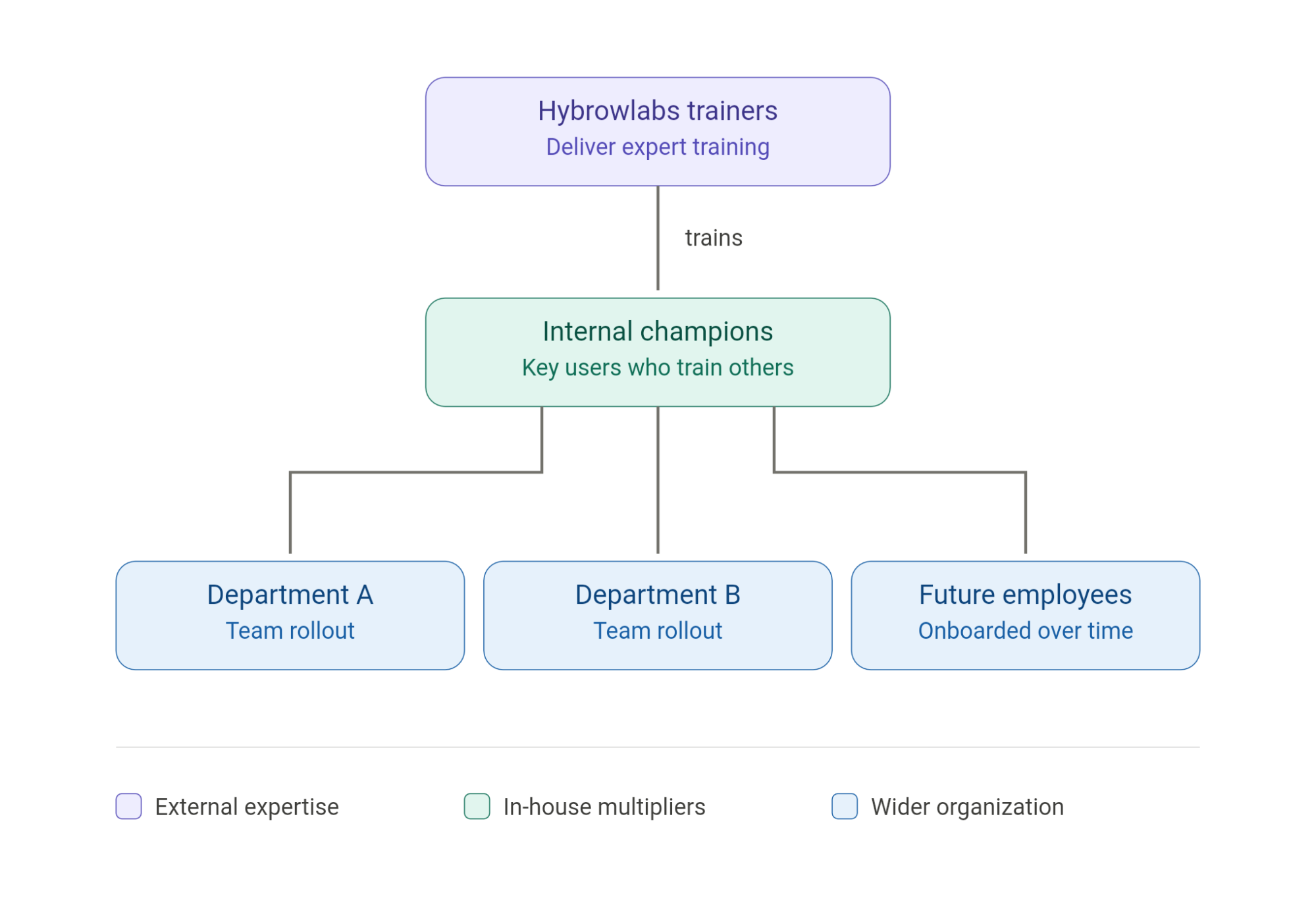
These internal champions are trained on:
- Department-specific workflows
- ERPNext best practices
- Common troubleshooting steps
- Reporting and approvals
- User onboarding processes
- Business process handling
Why it works: This approach helps you build internal ERPNext expertise, reduce dependency on external support, and onboard future employees more efficiently, especially for growing businesses, multi-location teams, and organizations planning long-term ERP adoption.
Frequently Asked Questions
Through a flexible, hybrid approach based on your team size and complexity: on-site at your office, remotely via Microsoft Teams or Google Meet, through recorded video modules, or a blended combination of all formats.
Up to twelve modules customized to your scope, from system navigation, roles and permissions, sales/CRM, purchase and inventory, accounting, GST and compliance, manufacturing, HR and payroll, project management, workflow automation, and reports/dashboards, through to custom features built specifically for your business.
Yes. We provide recorded training videos and documentation so new employees and teams needing refreshers can revisit workflows, processes, and module usage anytime after the live sessions.
During the initial usage phase, users can ask workflow questions, clarify process doubts, get help with reports and transactions, request module refreshers, and receive best-practice guidance. Duration and scope vary by project size, support plan, or AMC.
Yes. The Train-the-Trainer program gives selected champions advanced training on department workflows, best practices, troubleshooting, reporting and approvals, user onboarding, and business process handling, so they can support colleagues and onboard future employees.